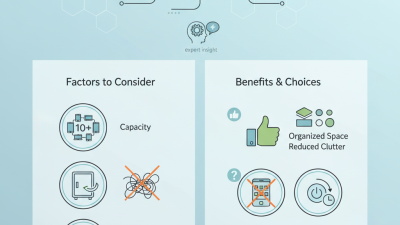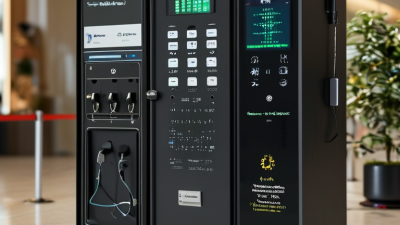
Choosing a Shared Charging Cabinet is less about finding the biggest unit and more about matching it to daily use. A cabinet for a library, school, office, or event space faces different traffic, device sizes, and supervision needs. Start with an honest count of phones, tablets, and laptops, including likely growth over the next year. Count the devices. Then check shelf dimensions, charging connections, power capacity, and whether users need access during the day. A crowded shelf can trap cables, while oversized compartments waste valuable floor space. Small details matter.
The seven tips in this guide focus on practical checks buyers can make before choosing a model. Compare clear product specifications and confirm that the cabinet’s electrical rating suits the intended devices and location. Look for sturdy construction, organized cable routing, ventilation, and access controls appropriate to the setting. These are not decorative extras. Daily wear reveals weaknesses quickly. Also consider installation, cleaning, warranty terms, replacement parts, and who will respond when a port stops working. Price alone is a poor guide. A low-cost cabinet may bring extra maintenance, but a premium model is not automatically better. Some requirements may only become obvious after installation; it is worth admitting that before purchase. Measure the space, review the specifications, and ask the supplier direct questions.

A shared charging cabinet should match the devices people actually bring, not an idealized inventory. List phone, tablet, and laptop models, then note connector type, charging requirements, and case thickness. IDC reported 1.17 billion smartphone shipments worldwide in 2023; that figure describes new shipments, not the devices in your building. Still, it signals why phone-only planning can miss a changing mix.
Tip: Count devices by type, then observe a busy day. If 24 devices may arrive but only 15 usually need power at once, size ports for the observed peak and leave room for exceptions. Avoid treating total capacity as simultaneous demand. Check whether laptop charging needs reduce the number of devices that can be powered together. A cabinet’s port count alone can mislead.
For one week, record how many devices are charging during the busiest 15-minute period. Add a modest reserve, perhaps two or three ports, if late arrivals are common. That buffer is a practical starting point, not a universal rule. Also test the arrangement with real devices: thick cases, bulky plugs, and tangled cables can make a well-counted cabinet awkward. My first estimate is often too neat; actual use tends to be messier.
Source: IDC, Worldwide Quarterly Mobile Phone Tracker, full-year 2023 results.

USB PD 3.1 can deliver up to 240 W, but that figure describes a supported maximum, not a guarantee for every device. A shared charging cabinet must have compatible power supplies, ports, and cables to reach it. Check the output rating printed beside each port, not just the cabinet’s headline wattage. A laptop marked for 140 W charging will not draw 240 W simply because the port allows it.
Look at the total power budget, too. If several users charge laptops and phones at once, the cabinet may divide available output among ports. Ask whether power is allocated dynamically and what happens when every port is occupied.
Not always.
A high-wattage port can still charge slowly if the cable or device cannot support the required power. For 240 W operation, the cable must support the applicable USB PD 3.1 extended-power range and current rating.
Heat matters as well: check that airflow is unobstructed and that charging stops or reduces output if temperatures rise. The top number is useful, but it can mislead. Compare the real per-port output under shared use with the devices people will actually bring.
When comparing shared charging cabinets, treat IEC 62368-1 as a safety checkpoint, not a marketing phrase. The standard addresses hazards from electrical energy, heat, fire, and mechanical parts in information and communications technology equipment. Ask which edition was used and whether the assessment covers the complete cabinet or only its charging modules. Details matter.
Check documentation against the exact model and configuration you plan to install. Review the rated input, charger outputs, cables, adapters, and any test report or certificate. A component report alone does not prove that every assembled cabinet configuration has been assessed. Paperwork can leave gaps. If the documentation is unclear, ask a qualified supplier or safety professional to explain its scope.
Look closely at practical details: cable strain relief, ventilation openings, door clearances, and how users access connectors. Confirm the cabinet’s permitted load and installation instructions, then check that the intended site can meet them. Blocked vents and tightly bundled leads may contribute to heat buildup during heavy use. No document replaces careful installation and routine inspection; that is easy to overlook.
A shared charging cabinet may sit in a dry lobby or beside a rain-exposed entrance. Check its enclosure rating against the actual installation, not just the product description. IEC 60529 classifies protection against solid objects and water using the IP code. The first digit refers to solids; the second refers to water. For example, IP54 means dust protection and resistance to splashing, while IP65 indicates dust-tight protection and resistance to water jets.
Read the test conditions carefully. IEC 60529 defines controlled tests, not a promise that a cabinet will withstand every site condition or remain protected indefinitely. A hose directed at a door seam, worn gasket, or cable opening can create a different risk than ordinary splashes. Small details matter. Ask for the test report for the complete enclosure, including doors and cable entries, rather than relying on a rating for an empty shell.
Match the rating to exposure. An indoor cabinet away from sinks may face little water, while a semi-open entrance can encounter wind-driven rain and cleaning spray. Consider dust, drainage, and maintenance too. A higher IP number is not always the whole answer; ventilation, heat, and regular seal inspection also affect reliable operation. I would verify the site conditions twice. They are easy to underestimate.
When comparing shared charging cabinets, inspect the access controls, not just the lock. Individual PINs, staff badges, or assigned user accounts can show who opened each compartment. Avoid a single shared code; it is hard to trace when several people use it. Verizon’s 2024 Data Breach Investigations Report found that 68% of breaches involved a human element. That broad figure is not cabinet-specific, but it reinforces the value of individual permissions and clear activity records. Small details matter.
Usage monitoring should show which bays are occupied, whether devices are charging, and when equipment was checked out or returned. Look for alerts when a device stays too long or a slot stops supplying power. IBM’s 2023 Cost of a Data Breach Report put the global average breach cost at $4.45 million; this is not a cabinet-risk estimate, but it makes sensible data handling worth checking. Ask who can view cabinet logs, how long records remain available, and whether reports can be exported. No dashboard is perfect. Test it with a real checkout.
Service support matters after installation. Confirm response hours, repair procedures, spare-part availability, and who handles software updates. Ask for a sample support ticket and a realistic response-time commitment. A cabinet may look simple, but a failed lock can interrupt a whole team’s routine. That can be awkward. Check whether support staff can diagnose faults remotely, and whether the provider explains what happens when connectivity drops.
| Tip | What to Compare | Access Controls | Usage Monitoring | Service Support | Best Fit |
|---|---|---|---|---|---|
| 1. Match capacity to demand | Number of bays, device size, and expected peak demand. Allow room for the largest devices users will charge. | Check whether access can be assigned per bay or per user, if that is needed for your workflow. | Look for bay status information, such as occupied, available, or charging, where supported. | Confirm how replacement parts and repairs are handled if a bay or lock stops working. | Schools, offices, libraries, and other shared-device environments. |
| 2. Choose an access method users can manage | Compare keys, PIN codes, cards or badges, and app-based access. Consider how access is issued and removed. | Prefer a method that suits your users and provides a clear way to revoke access when a code, card, or account is no longer valid. | Ask whether the system records access events and how long those records are retained. | Check whether administrators can get help with setup, lost credentials, and access changes. | Sites with regular user turnover or multiple administrators. |
| 3. Check monitoring and reporting | Identify which information is available: bay availability, charging status, access events, and fault alerts. | Confirm that monitoring permissions can be limited to authorized staff. | Determine whether reports are available locally or through a network connection, and whether data can be exported. | Ask who helps diagnose monitoring or connectivity problems and what information they need. | Facilities that need to track availability, investigate issues, or plan capacity. |
| 4. Verify device and power compatibility | Check bay dimensions, outlet or charging-port type, supported power, and the devices intended for use. | Make sure access controls do not prevent users from retrieving devices during the hours the cabinet is in service. | Where available, verify whether the system can show charging status or identify a bay that is not working. | Confirm the process for assessing power, cabling, and device-compatibility issues. | Organizations with a defined mix of laptops, tablets, or other portable devices. |
| 5. Review physical and electrical safety | Assess cabinet stability, ventilation, cable management, installation requirements, and applicable local electrical and fire-safety requirements. | Consider whether doors and bays remain secure while devices are stored and charging. | Check whether faults such as power interruptions or overheating are detected; do not assume every model provides these alerts. | Ask for installation guidance and the recommended inspection and maintenance procedures. | Busy public or shared areas where equipment is used throughout the day. |
| 6. Evaluate service and warranty terms | Compare warranty coverage, exclusions, service availability, and the process for requesting repairs. | Ask how access can be maintained or restored if the electronic lock or control system fails. | Find out whether diagnostic logs or remote troubleshooting are available and what network access they require. | Check support hours, response expectations, repair arrangements, and availability of replacement components. | Sites where cabinet downtime would interrupt daily operations. |
| 7. Consider administration and total operating effort | Include installation, user onboarding, credential management, cleaning, maintenance, and any recurring service costs. | Prefer a straightforward process for adding and removing users, especially when access is shared across teams. | Review whether reports help staff spot unused capacity, frequent faults, or recurring access problems. | Confirm who handles software updates, administrator training, and ongoing technical questions. | Organizations comparing long-term usability as well as initial purchase requirements. |
Note: Features vary by cabinet model and configuration. Confirm specifications, access methods, monitoring capabilities, safety requirements, and service terms with the supplier before purchase.